building a streaming pc in march 2026 hits different than it did even a year ago, the ai datacenter boom ate up significant memory supply, pushing ddr5 prices notably higher we’re seeing increases ranging from 40 to 120 percent depending on the kit and manufacturer since mid 2025, a 32gb kit that cost around $150 to $200 last year now runs you $240 to $360 in certain cases, and analysts don’t expect things to normalize until late 2027.
This budget streaming gaming pc build guide shows what still makes sense to buy.
but here’s the good news: hardware encoding has completely changed the game for budget streamers, you don’t need a second pc or an expensive 12 core processor anymore.
A solid six core cpu paired with a gpu that has nvenc handles 1080p60 streaming while barely touching your frame rates, the under $900 tier in march 2026 can still get you a genuinely capable setup if you know where to spend.
Hardware encoding makes single pc streaming viable
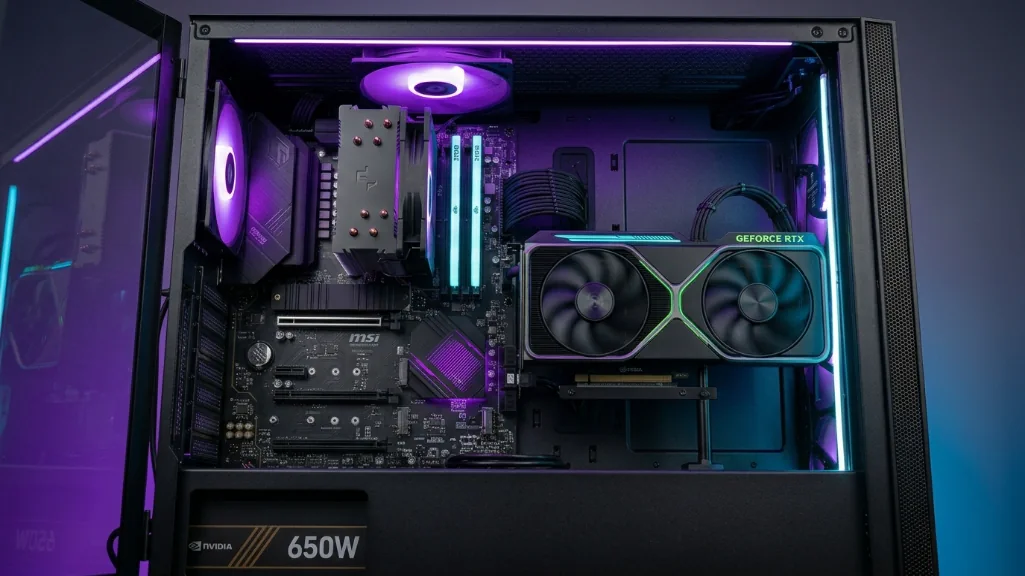
modern graphics cards have dedicated encoding chips built right in. nvidia’s NVENC on the rtx 4060 and 5060 does all the heavy lifting of compressing your stream without touching your cpu or gaming performance. we’re talking roughly one to five percent performance impact when streaming versus gaming alone.
| encoder type | cpu usage | gpu impact | quality at 6000 kbps | best for budget builds |
|---|---|---|---|---|
| cpu x264 (medium) | 40-60% | none | excellent | no – way too demanding |
| nvenc (rtx 4060/5060) | 0-2% | 1-5% | excellent | yes – perfect choice |
| amd amf (rx 7000) | 0-2% | 3-8% | very good | yes – solid alternative |
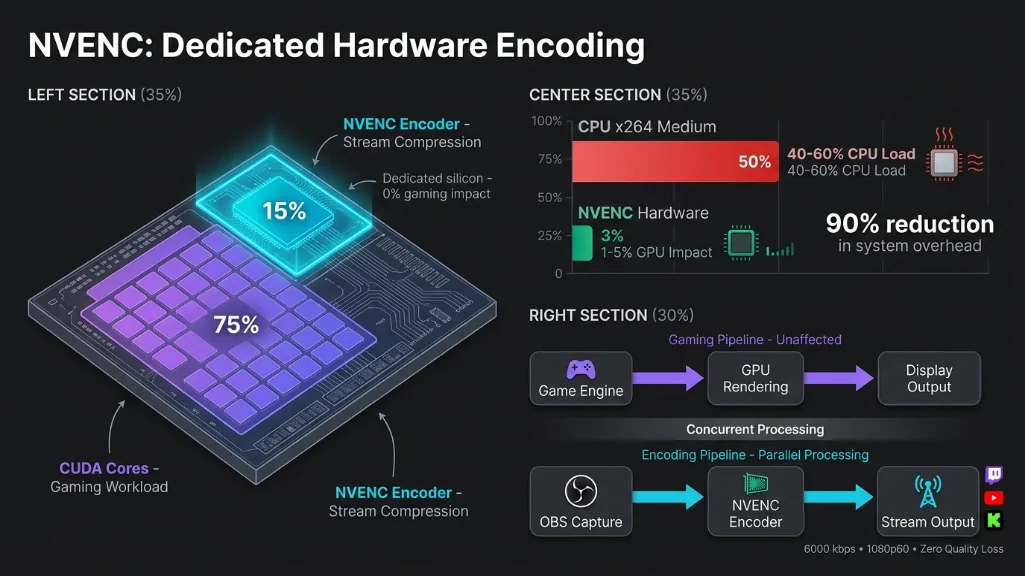
the difference is massive, cpu encoding with x264 medium preset would tank a six-core processor, eating 40 to 60 percent of your resources and crushing your frame rates, nvenc uses maybe two percent cpu and barely five percent of your gpu’s capacity, your cpu stays focused on running the game while dedicated silicon handles the broadcast.
What the march 2026 market actually looks like
understanding current pricing is critical because the market shifted hard. memory is the big story ddr5 costs have exploded while cpus actually got cheaper.
| component | mid-2025 price | march 2026 price | change | impact |
|---|---|---|---|---|
| ddr5 32gb kit | $180-220 | $240-360 | +33% to +100% | significant |
| ddr5 16gb kit | $130-150 | $150-180 | +15% to +38% | moderate |
| ryzen 5 9600x | $279 msrp | $179-189 | -32% to -36% | great news |
| rtx 5060 | $299 msrp | $349 retail | +17% vs msrp | moderate |
| rtx 4060 | $299 | $289-299 | stable | good value |
| 1tb nvme pcie 4.0 | $70-80 | $90-110 | +29% to +38% | manageable |
| b650 motherboard | $130-160 | $140-170 | +8% to +13% | minimal |
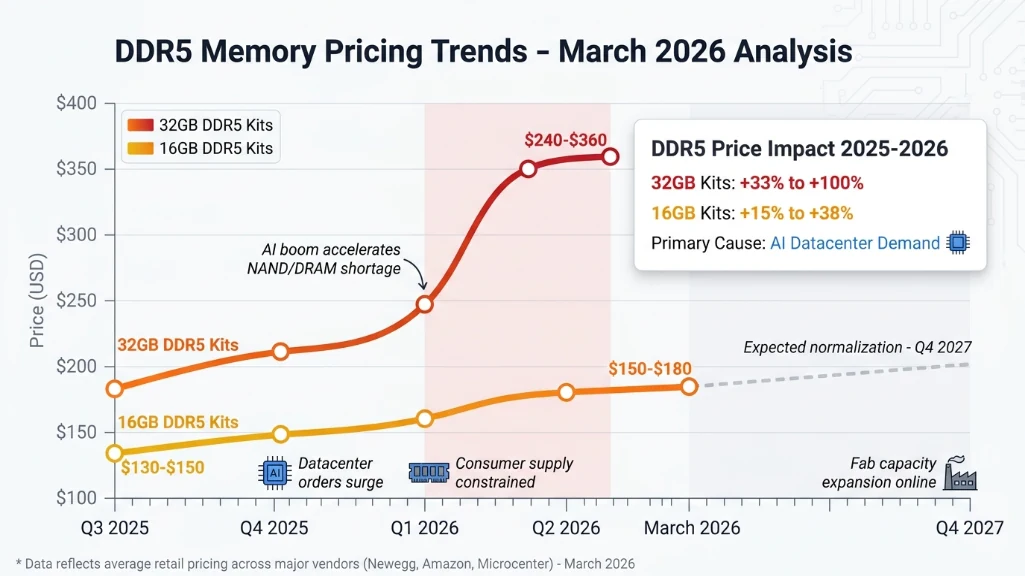
ram now eats roughly 25 to 30 percent of your budget in many configurations instead of the historical 10 to 15 percent, that’s a significant shift, but the ryzen 5 9600x dropping from $279 to under $190 helps offset some pain, and graphics cards stayed relatively stable.
32gb ram isn’t optional anymore in 2026
sixteen gigabytes worked fine for streaming in 2024, it doesn’t in 2026. modern aaa games consume 12 to 14gb during gameplay before you even launch obs, discord, or browser tabs for chat. you’re hitting memory ceilings constantly with 16gb, causing stutters that viewers see even if obs says your encoding is fine.
| system load | 16gb usage | 32gb usage | result with 16gb |
|---|---|---|---|
| gaming only | 10-14gb | 10-14gb | comfortable |
| gaming + obs + discord | 13-15.5gb | 13-16gb | tight, occasional stutters |
| + browser tabs open | 15-16gb maxed | 15-18gb | stuttering likely |
thirty-two gigabytes is the realistic minimum, a quality ddr5-6000 kit costs $240 to $300 depending on whether you want rgb and tight timings. that hurts in a sub-$900 build, but it’s the difference between smooth streams and janky performance.
if budget is genuinely tight, starting with 16gb and upgrading within a few months works, but understand you’ll feel the limitation, just make sure your motherboard has four dimm slots so you can add another kit later instead of replacing what you bought.
The cpu and gpu choices that matter
for the processor, the amd ryzen 5 9600x at $179 to $189 hits the sweet spot. six cores, twelve threads, zen 5 architecture, 65 watt tdp that works with budget coolers. in gaming benchmarks, this cpu typically achieves 160 to 175 fps average when tested with high-end cards at 1080p in common titles, meaning it won’t bottleneck mid-range gpus like the rtx 4060 or 5060.
| cpu | cores/threads | tdp | price | streaming fit |
|---|---|---|---|---|
| ryzen 5 9600x | 6c/12t | 65w | $179-189 | ideal – efficient and affordable |
| ryzen 5 7600 | 6c/12t | 65w | $199 | great – saves $20 vs 9600x initially |
| ryzen 5 7600x | 6c/12t | 105w | $176 | good but needs better cooling |
the 7600 at $199 is a solid alternative if you find it in stock. performance difference is minimal we’re talking a few percentage points, the 9600x wins on efficiency and currently costs less despite being newer.
for graphics, you’re choosing between the rtx 4060 at $289 to $299 or the rtx 5060 at $349, both use the same nvenc encoder generation, so stream quality is identical. the difference shows up in your local gaming experience.
| gpu | price | raster performance | dlss | streaming quality |
|---|---|---|---|---|
| rtx 4060 | $289-299 | baseline (100%) | dlss 3 | excellent nvenc |
| rtx 5060 | $349 | +15-20% faster | dlss 4 multi frame gen | excellent nvenc |
the rtx 4060 typically delivers 60 to 90 fps in demanding titles at high settings, depending on the specific game and settings, the rtx 5060 pushes that to roughly 70 to 110 fps in similar conditions, and dlss 4’s multi frame generation can improve performance up to 2x in supported games with optimal configurations. for streaming specifically, both give you clean 1080p60 broadcasts at 6000 kbps with minimal performance impact.
the decision comes down to whether that extra $60 for the 5060 is worth 15 to 20 percent better performance and dlss 4, if budget is genuinely maxed, the 4060 gets you streaming with identical quality, if you can stretch slightly, the 5060 provides more headroom.
The two budget streaming gaming PC build options
here’s where theory meets reality, two configurations hit different points on the value versus performance spectrum.
Value build (~$830-$880)
| component | choice | price | why this matters |
|---|---|---|---|
| cpu | ryzen 5 7600 | $199 | saves $20, nearly identical performance |
| gpu | rtx 4060 8gb | $289-299 | excellent nvenc, saves $60 vs 5060 |
| motherboard | b650 atx | $150 | am5 platform, upgrade path through 2027+ |
| ram | 16gb ddr5-6000 | $150-180 | tight but workable, plan upgrade |
| storage | 1tb nvme pcie 4.0 | $90 | fast enough for streaming |
| psu | 550w 80+ bronze | $70 | adequate for this config |
| case + cooler | budget mesh + tower | $80-100 | phanteks g400a + id-cooling |
| total | streaming ready | $838-$888 | under budget ceiling |
this gets you streaming now with typically 60 to 90 fps in aaa titles and 120 to 180 fps in esports games, depending on specific titles and settings, the 16gb ram is the compromise you’ll want to upgrade to 32gb within a few months, but it works for less memory intensive titles if you close background apps, stream quality is excellent through nvenc.
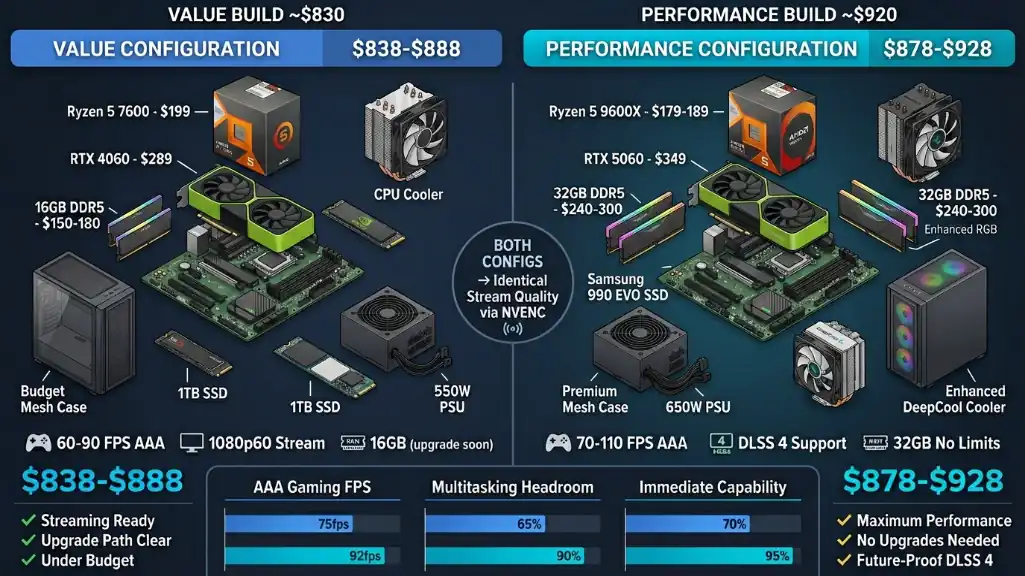
Performance build (~$870-$920)
| component | choice | price | why this matters |
|---|---|---|---|
| cpu | ryzen 5 9600x | $179-189 | latest zen 5, better efficiency |
| gpu | rtx 5060 8gb | $349 | 15-20% faster, dlss 4 future-proof |
| motherboard | b650 atx | $150 | am5 platform, upgrade path through 2027+ |
| ram | 32gb ddr5-6000 | $240-300 | smooth streaming, no stutters |
| storage | 1tb nvme pcie 4.0 | $90-110 | samsung 990 evo or similar |
| psu | 650w 80+ bronze | $70-80 | handles 5060 + future gpu upgrades |
| case + cooler | budget mesh + tower | $80-100 | cooler master td500 + deepcool ak400 |
| total | maximum capability | $878-$928 | slight stretch over $900 |
this pushes typical frame rates to 70 to 110 fps in aaa titles depending on the game, with dlss 4 multi frame generation potentially improving performance up to 2x in supported titles with optimal settings, the 32gb ram eliminates stuttering even with heavy multitasking during streams, you won’t need upgrades immediately this config has headroom for growth.
What you actually get
| metric | value build | performance build |
|---|---|---|
| aaa fps (high settings) | 60-90 fps | 70-110 fps |
| esports fps | 120-180 fps | 140-220 fps |
| stream quality | 1080p60 excellent | 1080p60 excellent |
| multitasking | adequate with 16gb | excellent with 32gb |
| near-term upgrades | ram to 32gb needed | none required |
note: fps ranges vary by specific game, settings, and resolution. values shown reflect typical performance in common titles.
both deliver identical stream quality to your viewers they’re using the same nvenc encoder, the performance gap shows up in how smooth your local gameplay feels and whether you can run discord, browser tabs, and overlays without stuttering.
Obs settings that actually matter
getting the hardware right is half the battle. you need obs configured to use nvenc instead of accidentally defaulting to cpu encoding.
| setting | value | why |
|---|---|---|
| encoder | nvenc h.264 (new) | uses gpu hardware, not cpu |
| rate control | cbr | constant bitrate, stable quality |
| bitrate | 6000 kbps | twitch max for non-partners |
| preset | quality | best encoding efficiency |
| keyframe interval | 2 seconds | platform requirement |
| base resolution | 1920×1080 | your monitor resolution |
| output resolution | 1920×1080 | what viewers see |
| fps | 60 | smooth motion |
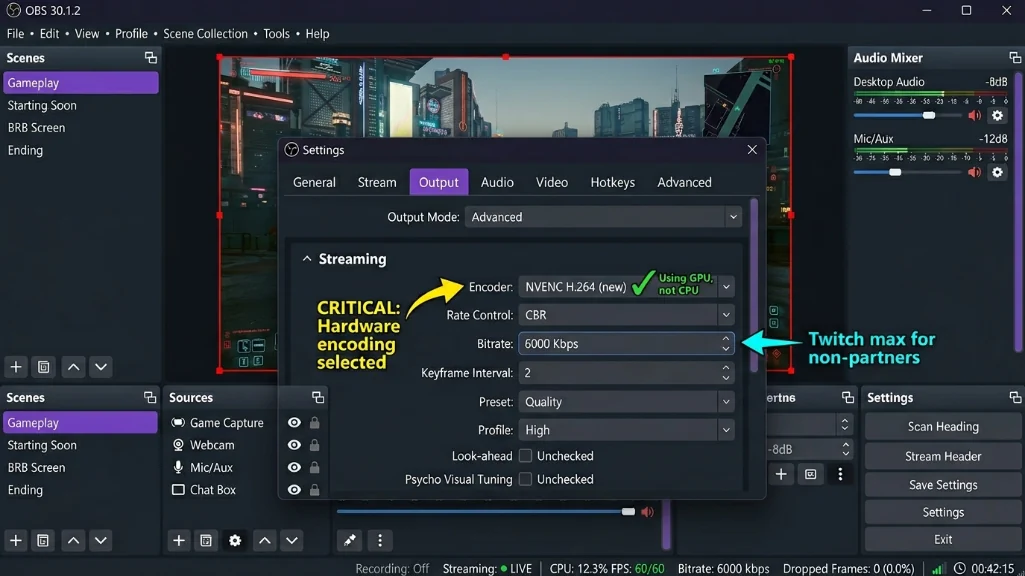
make absolutely sure encoder shows “nvenc h.264” and not “x264” under output settings. if it says x264, you’re cpu encoding and your frame rates will tank, the bitrate at 6000 kbps matches twitch’s cap for non partners going higher doesn’t help on that platform. for youtube you can push 8000 kbps if your upload speed supports it.
your upload speed needs to be roughly 20 to 30 percent higher than your stream bitrate for stabilit, streaming at 6000 kbps requires about 8 mbps upload minimum, anything less and you’ll get dropped frames.
The parts that matter less (but still matter)
motherboards: stick with b650 chipset boards around $150. they support all current am5 processors, offer pcie 4.0, and the platform has upgrade paths through 2027 and beyond. amd committed to socket longevity, meaning you can drop in a ryzen 7 or ryzen 9 two years from now without changing your motherboard or ram.
storage: 1tb nvme pcie 4.0 drives run $90 to $110, they deliver read speeds over 5000 mb/s, making game loading fast and letting you record local vods smoothly, brands like wd blue sn580 or samsung 990 evo work great.
power supply: get a 550 watt unit for the value build or 650-watt for the performance build, both with 80 plus bronze certification minimum, spend $60 to $80 from known brands like corsair, evga, or thermaltake. cheap no name psus can literally destroy your entire system if they fail.
case and cooling: budget mesh cases with included fans run $60 to $80. the phanteks eclipse g400a with four 140mm fans or montech air 903 both deliver good airflow. for cpu cooling, the ryzen 5 9600x needs a tower cooler since it doesn’t include one the thermalright assassin spirit 120 v2 at around $15 handles it perfectly.
Critical mistakes to avoid
using wifi for streaming introduces latency spikes and dropped frames that viewers see even if obs says everything is fine, run ethernet cable, even if you need a 50 foot cable routed along baseboards, your stream quality depends on stable upload.
skimping on the psu to save $20 risks your entire $900 investment, a failing cheap psu can take every component with it, buy from known brands with multi year warranties.
thinking 16gb is enough long term. it’s not, modern games use 12 to 16gb alone before streaming overhead, if you start with 16gb, plan that upgrade within a few months or accept occasional stuttering during heavy multitasking.
the reality check for march 2026
building under $900 for streaming in march 2026 is doable but requires smart choices, the memory shortage shifted where your money goes ram now takes a bigger chunk of the budget, but cpu prices dropping and nvenc hardware encoding being standard on mid range gpus makes single-pc streaming achievable at this tier.
the value build at $830 to $880 gets you streaming with good quality and a clear upgrade path, the performance build at $870 to $920 maximizes what you can do immediately, neither choice is wrong it depends whether you value staying under budget or eliminating near term upgrades.
both produce 1080p60 streams that look as good as broadcasts from much more expensive systems, that’s the power of hardware encoding, your viewers won’t know whether you’re using a $900 build or a $2000 build because the nvenc quality is identical.
the am5 platform gives you room to grow. start with a six core processor now, drop in an eight or twelve core chip in 2027 or 2028 without changing anything else, that’s genuine future-proofing that actually matters.
component availability matters too b650 motherboards were discontinued in may 2025 and remaining stock is depleting through q1 q2 2026, if you’re building on the ryzen platform, securing a motherboard sooner makes sense before popular models sell out entirely.
the sub-$900 streaming pc in march 2026 delivers real capability, not bare minimum functionality, you’ll game at respectable frame rates, broadcast quality streams, and have a platform that supports growth as your channel develops, that’s what budget streaming builds are supposed to do.